
If the constant buzzing and ringing of your phone disrupt your focus, rest assured that you're not alone. Discover how to create, schedule, and personalize Focus modes on your iPhone, empowering you to concentrate on what matters most.
One of our favorite aspects of my iPhone is the introduction of the Focus feature, which Apple released alongside numerous other enhancements in iOS 15. With Focus, users can create personalized "modes" on their devices, enabling them to prioritize specific notifications and determine when they should prompt an alert.
Customizing your Focus mode is key to maximizing its benefits. In this guide, We will walk you through the steps and share how to utilize this feature on your iPhone.
Using the Focus Feature on your iPhone Requirements: To set up the feature, you'll need an iPhone running iOS 15 or later. The steps remain the same if you're using a Mac, MacBook, or iPad with macOS Monterey, iPadOS 15, or later. The setup process typically takes around 10 to 20 minutes.
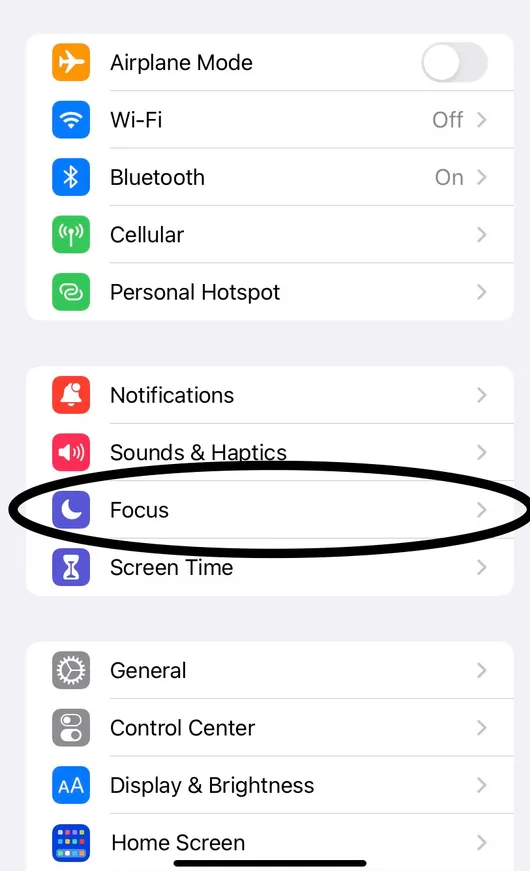
Step 1. Open Settings and locate Focus To access the Focus modes on your iPhone, simply open the Settings app. Within the second group of settings, you'll find the Focus tab.
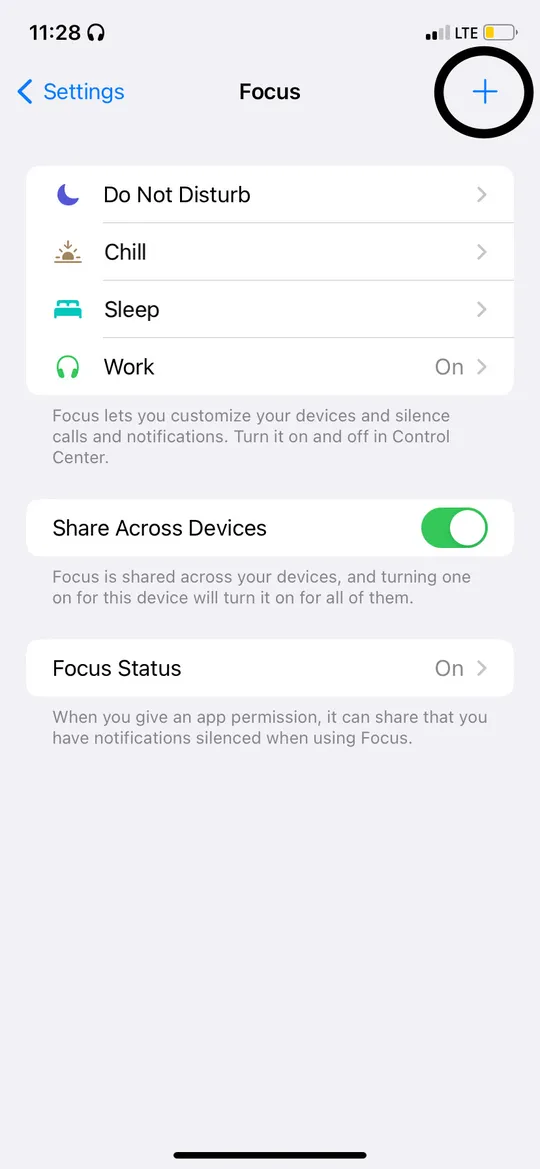
Step 2. Create a Focus mode In the Focus tab, you'll find preset Focus modes like Sleep, Personal, and Work. If you desire additional modes, tap the plus icon in the top right corner to create a new one.
When creating a Focus mode, you can choose from a list of predefined modes such as Driving, Gaming, or Reading. Alternatively, you can give it a custom name and select an icon that aligns with the vibe of your Focus.
Next, customize the Focus mode by allowing notifications from specific apps and contacts or by silencing notifications from certain apps and contacts when the mode is active.
Step 3. Personalize your Focus usage You can establish a schedule for your Focus modes by manually setting the times when a mode should automatically turn on or off. Alternatively, you can use Smart Activation, which allows your phone to activate a Focus mode based on your location or the apps you're using.
During the setup process, you can enable Share Across Devices and Focus Status. Sharing across devices ensures that the Focus modes you set up on one Apple device will sync with your other devices linked to the same Apple ID.
With Focus Status, you can notify others when you have a Focus mode active, which will silence their notifications on your device. For example, if you have messages silenced from a specific contact while in Personal Focus mode, they will see in their iMessage app that your notifications are muted.
However, be aware that if you have silenced notifications from someone and they send you a message, their iPhone will provide an option to "Notify Anyway." If they select this option, you will receive a notification. In some of your Focus modes, this feature better be turned off, of you do not want to be notified of someone's text.
If they choose not to notify you anyway or if you have Focus Status turned off, their message will still appear in your Notification Center, but your phone will not ring or vibrate.
FAQs Q: Can I turn a Focus mode on or off without opening Settings? A: Yes, you can. Swipe down on the right side of your screen to open the Control Center. On the left side, you'll see the current active Focus mode. Tapping on it allows you to switch to a different mode, turn off the current mode, or create a new one using the "+" button at the bottom of the screen.
Q: Will Focus modes affect my alarms? A: No, your Focus settings will not impact alarms, timers, or reminders in the Health or Reminders app. As long as your alarms and reminders are set correctly, and your ringer volume is adequate, you will hear them. If you have a sleep schedule set up in the Health app, your Sleep Focus mode will automatically synchronize with your bedtime and wake-up time.
Q: Who can see my Focus Status? A: Apple has not explicitly disclosed which apps display your Focus Status. However, we do know that your contacts can see when your iMessage notifications are silenced. You can turn off your Focus Status specifically for a contact by accessing their contact card.